Intros and openers
Start the show with a clean video package without turning your encoder into a media bin.
Roll show media from a dedicated A/B playback surface. A-B Roll is a dual-deck NDI media player for Mac live productions that need reliable video roll-ins, show packages, bumpers, loops, and client media without crowding the main encoder.
Built for OBS, Wirecast, vMix, NDI Monitor, and Mac-based production workflows. Learn more about A-B Roll as an NDI playback deck or NDI media player for Mac. Need help or want to send feedback? Email adam@mixup.live. Read our Privacy Policy. View Release Notes.
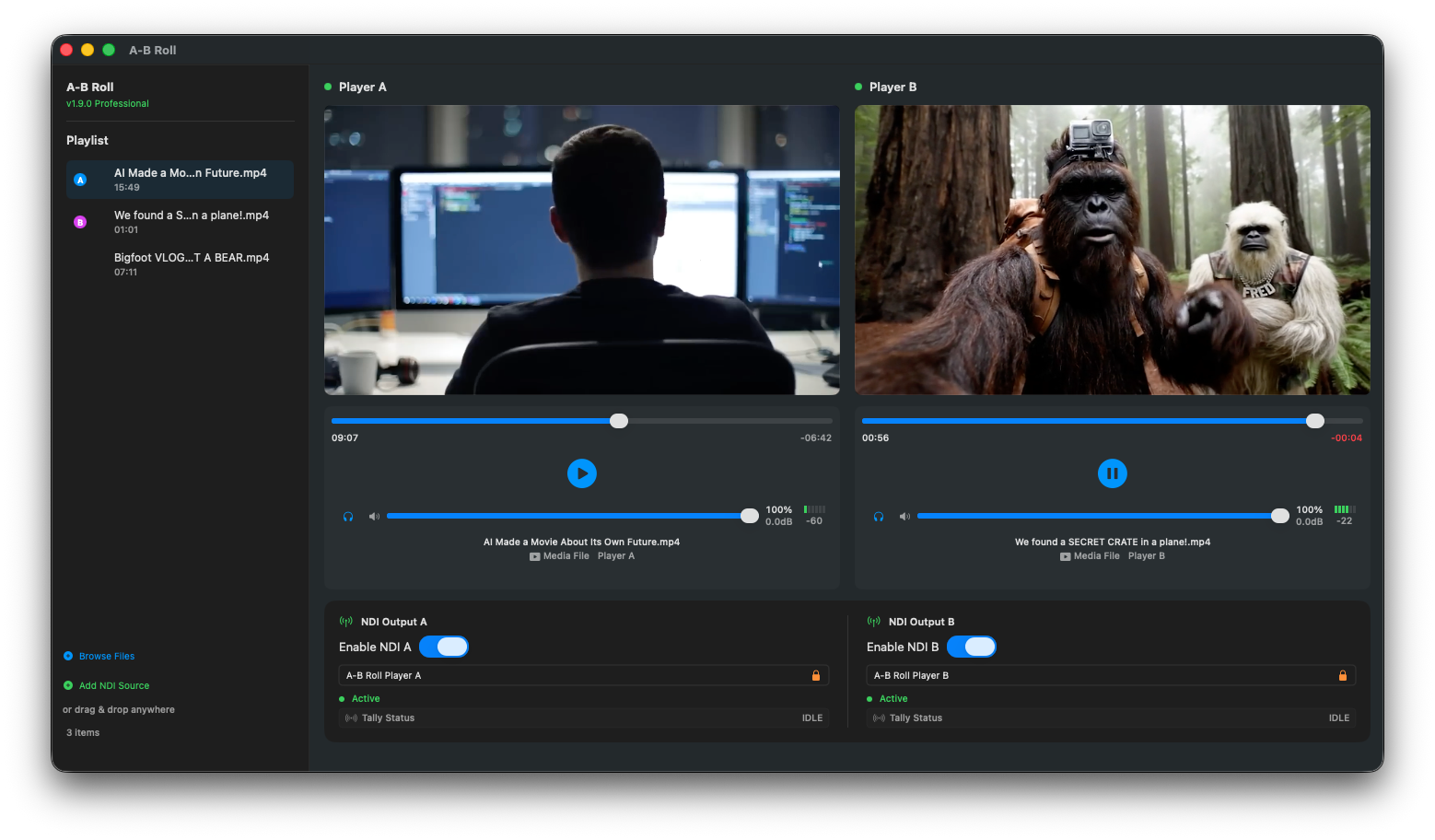
The bigger the show gets, the more the encoder becomes a crowded control room: cameras, scenes, audio, graphics, recordings, guests, chat, overlays, and every last-minute video file. A-B Roll gives NDI playback its own focused place to live.
A-B Roll is the place where show media gets loaded, checked, cued, monitored, and sent into the production as NDI. It gives operators a focused Mac playback deck for the moment when someone says, “roll the clip.”
Use it for livestreams, podcasts, webinars, education, corporate events, sports shows, and small production teams that need reliable A/B media playback.
Use A-B Roll when playback deserves a dedicated operator surface, clean NDI output, and a simpler way to cue show media during live production.
| Workflow need | Typical approach | A-B Roll advantage |
|---|---|---|
| Play video roll-ins | Load clips into OBS, Wirecast, vMix scenes, or a crowded media bin. | Run roll-ins from a focused dual-deck NDI playback surface. |
| Run show packages and bumpers | Manage files manually while the live show is already in progress. | Keep intros, bumpers, packages, loops, and holding clips ready in A/B wells. |
| Send playback into production | Capture a display, window, or app-specific media source. | Send clean NDI playback sources into OBS, Wirecast, vMix, NDI Monitor, and compatible receivers. |
| Keep the encoder stable | Add more scenes, sources, media files, and last-minute changes to the main encoder. | Separate playback responsibility from switching, streaming, recording, and graphics. |
| Confidence monitor media | Watch playback inside the same overloaded production app. | Use focused player wells, playlist controls, level visibility, and monitoring for operator confidence. |
A-B Roll is built for the practical media moments that deserve more confidence than a buried source inside a crowded encoder scene collection.
Start the show with a clean video package without turning your encoder into a media bin.
Keep show media ready to roll from a dedicated deck instead of hunting through scenes.
Load interviews, explainers, highlight reels, or show packages into A/B playback wells.
Give waiting-room, break, and reset media a stable place outside the main show file.
Have a slate, loop, or holding video ready when the live show needs cover.
Feed playback into OBS, Wirecast, vMix, NDI Monitor, and compatible NDI workflows.
A-B Roll focuses on operator workflow: persistent local playlists, resizable rundowns, playlist ordering, keyboard shortcuts, loaded-item tracking, and filename tooltips.
Operate two player wells independently so one clip can be ready while another is in use.
Enable NDI outputs before media is loaded, keep sources alive after clearing media, and give downstream tools stable placeholder output.
Keep an eye on levels and monitoring so media audio is not a mystery when the show is live.
Move between empty wells, media, still images, and placeholder output with more reliable NDI behavior.
Still images now output over NDI in a predictable 16:9 frame, with transparent images composited over black.
Media files can loop independently in each player well, with loop controls shown only when they are relevant.
We are keeping the center of gravity simple: practical NDI playback first. Automation and remote operation come after the deck feels trustworthy.
Current development is focused on operator workflow, playlist persistence, faster shortcuts, and playback confidence.
The next layer is speed, confidence, and show operation.
A-B Roll is actively improving, and real production setups matter.
A-B Roll starts as a local NDI playback deck. Longer term, remote playback could let another operator handle show media from somewhere else while the main encoder stays focused on the live stream. That is the kind of automation we care about: human, practical, and useful under pressure.
Download A-B Roll, test the playback workflow, and upgrade to Pro when you are ready for production use.
$0
Test A-B Roll with basic playback and NDI workflow.
$69 USD
One-time purchase. Includes activation on up to 2 Macs.
Download the current macOS release, install A-B Roll, and test persistent playlists, resizable rundowns, playlist ordering, keyboard shortcuts, and the dedicated dual-deck workflow in your own production setup. Existing users can also use A-B Roll → Check for Updates…
Test A-B Roll with your real Mac, your real encoder, your real NDI tools, and the weird media files that show up right before a live production. Operator feedback shapes what ships next.
A-B Roll is a dedicated dual-deck NDI playback deck and media player for Mac live production workflows.
Yes. A-B Roll is built for NDI-friendly production workflows and can feed playback into OBS, Wirecast, vMix, NDI Monitor, and other compatible NDI receivers.
Yes. A-B Roll is built around NDI-friendly live production workflows, including NDI input, persistent NDI output, stable placeholder sources for empty wells, and still-image output over NDI.
A-B Roll is designed for video roll-ins, intros, show packages, pre-recorded segments, countdowns, loops, holding clips, still-image slates, and other live-show media.
Yes. A-B Roll supports per-well Loop playback, operator keyboard shortcuts, and persistent local playlist/rundown workflows.
The Mac download is available from this page. Use any Download for Mac button to install A-B Roll.